
Introducing the Notifications Hub
Agora introduces the Notifications Hub: Multi-channel notification control for governance, forums and grants.
Never Miss a Governance Moment
Staying on top of governance activity has always been a challenge. Proposals move fast, forum discussions evolve quickly, and grant decisions happen on their own schedule. Until now, keeping up meant checking multiple platforms manually or relying on a single notification channel that might not fit your workflow.
The Notifications Hub changes that. It's a centralized preferences screen where you configure exactly how you receive governance notifications — across multiple channels, for the specific events you care about.
Multi-Channel, Per-Event Control
The Notifications Hub supports five notification channels, each operating independently:
- Email — Notifications delivered directly to your inbox with verification
- Discord — Messages sent to your own Discord channel via webhook
- Slack — Notifications delivered to your own Slack channel via incoming webhook
- Telegram — Real-time mobile updates through the Agora Telegram bot
- Browser Push — Native browser notifications on your current device (mobile, tablet or laptop)
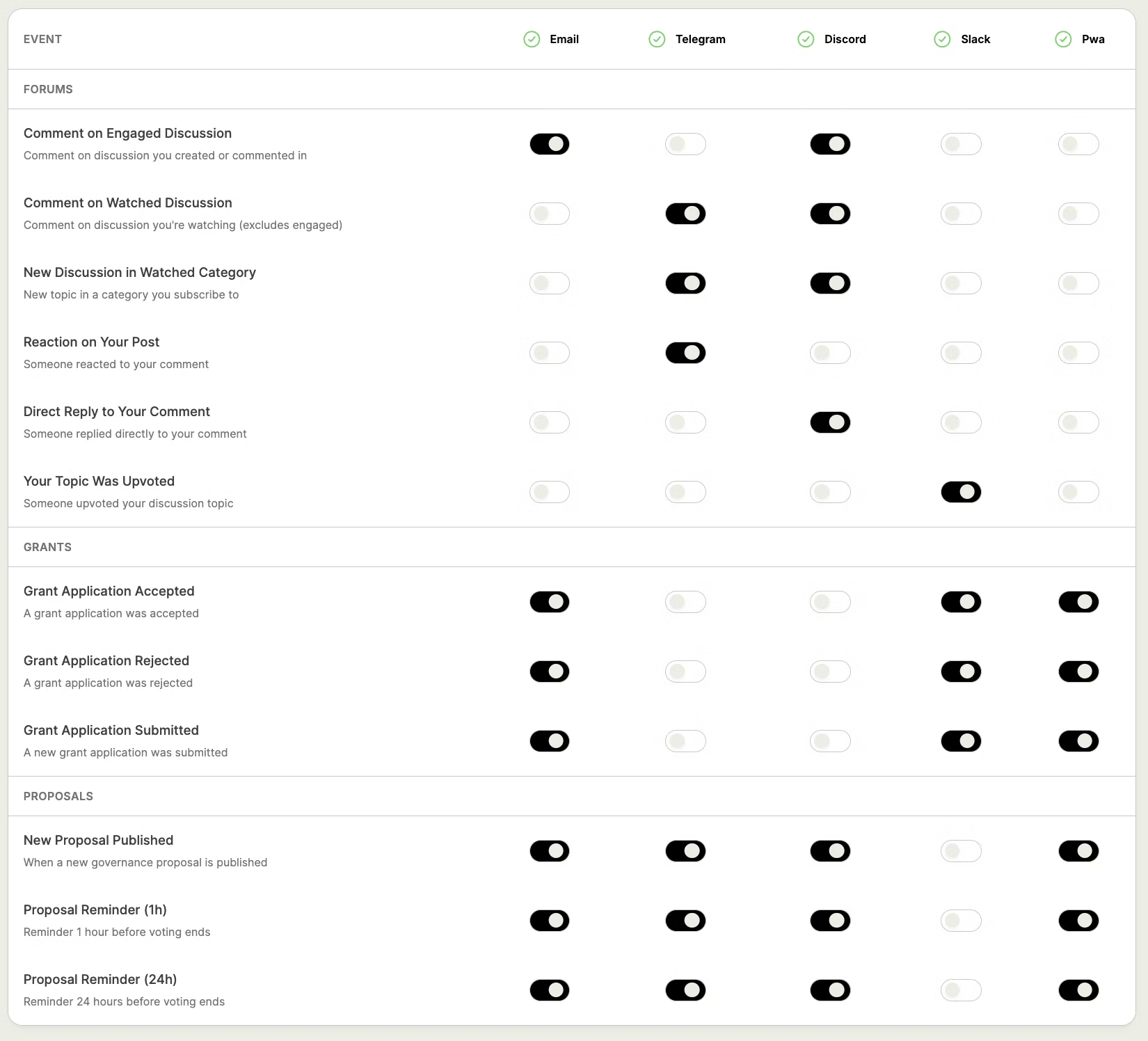
Connect as many channels as you like, then use the notification settings to toggle notifications on or off for each combination of event and channel. Want email notifications for new proposals but Discord-only for forum activity? Done. Telegram alerts for voting deadlines but nothing else? That works too.
Your preferences are tied to your connected wallet and save automatically as you make changes.
Getting Started
Setup takes just a few steps:
-
Sign to manage notifications — Connect your wallet and select "Sign to manage notifications" from the wallet dropdown. The signature simply verifies wallet ownership; it does not grant any permissions or authorize transactions.
-
Connect your channels — Add any combination of email, Discord webhook, Slack webhook, Telegram, or browser push. Each channel has a straightforward setup flow — enter a webhook URL, verify an email, or link a Telegram account.
-
Choose your events — Use the events table to enable or disable notifications per channel. Each row is a specific event type, each column is a connected channel.
What You Can Be Notified About
Notifications are organized into categories based on governance activity:
Forums — Stay engaged with community discussions. Get notified when someone comments on a discussion you're following, replies directly to your comment, reacts to your post, or when a new discussion appears in a category you subscribe to.
Proposals — Never miss a vote. Receive alerts when new proposals are published, plus configurable reminders at 24 hours and 1 hour before voting ends.
Grants — Track grant program activity with notifications for application submissions, acceptances, and rejections. Grants notifications are permission-gated — only users with the appropriate grants management permissions can view and configure them.
Permissions & Access Control
Certain notification categories are restricted to users with the appropriate permissions. For example, Grants notifications are only visible to users with grants management access. This ensures sensitive governance information is only delivered to authorized individuals. Once your wallet is granted the necessary permissions, restricted categories automatically appear in your Notifications Hub.
Rolling Out Now
The Notifications Hub is rolling out to select Agora deployments starting today. Whether you're a delegate tracking proposals, a community member following forum discussions, or a grants manager overseeing applications — the Notifications Hub ensures you stay informed on your terms.
Ask your Agora Account manager how to get the Notification Hub enabled for your Agora Deployment today.
Guide to Configuring
The video below explains how it all works!
Check out the docs for more info.